Project Background
CareOneClinics is a modern healthcare platform designed to digitize and unify clinic workflows — from patient check-in to prescription. Built for small to mid-sized clinics, it integrates patient queue management, Electronic Medical Records (EMR), e-prescribing, and administrative oversight into a seamless web-based system.
The goal was to eliminate the outdated, fragmented processes that slow down care delivery and create inefficiencies for medical staff and patients alike.
My Role
I served as the Lead Product Designer, responsible for:
Information architecture and journey flows
UX wireframes and prototyping
UI design across web and in-clinic screens
Collaboration with clinical advisors and engineers
Developer handoff and QA support
Core Problem
Healthcare clinics often struggle with:
Manual patient queueing systems.
Fragmented workflows for doctors and admins.
Lack of digital integration for prescriptions and patient history.
Poor brand perception due to outdated landing pages.
We set out to design a modern system that solves these pain points across the entire care delivery journey.
Key Requirements
Digital Queue System | We designed a kiosk-friendly UI for patient check-in and QR ticket generation. Queue updates are shown on large screens in waiting rooms. |
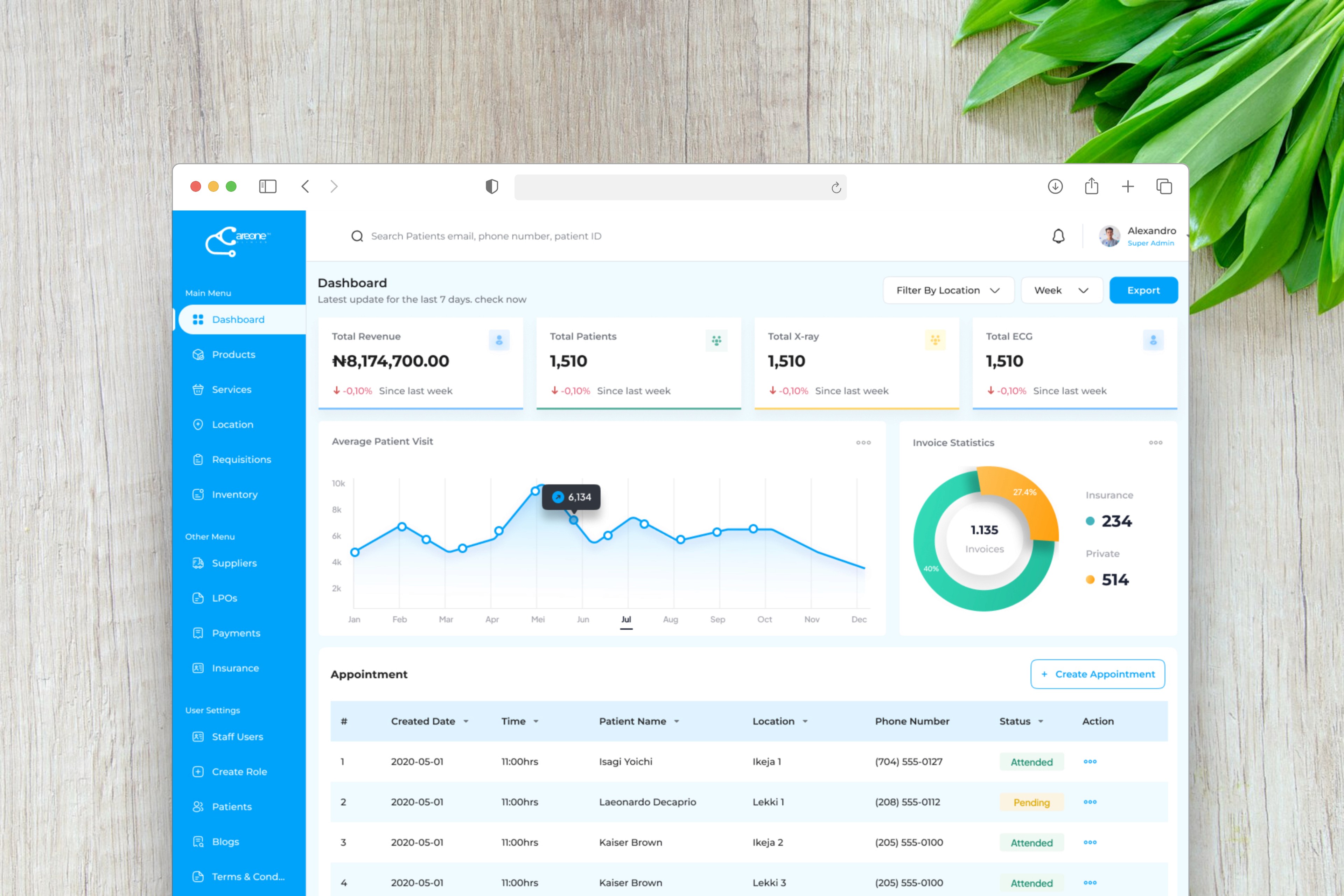
Admin Dashboard | Focused on operational control — number of patients in queue, staff availability, and daily logs. |
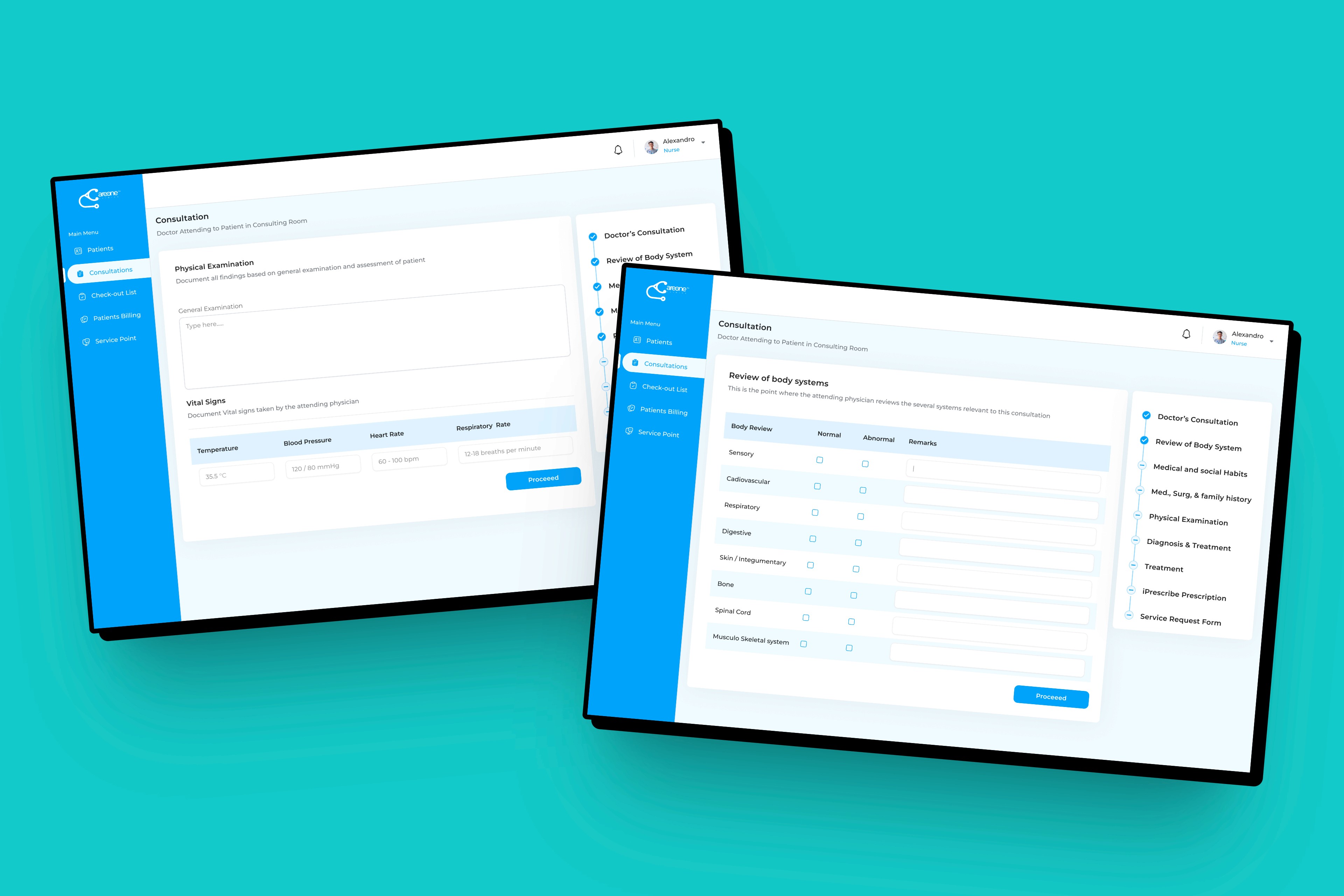
EMR Interface | Structured tabs for history, vitals, diagnosis, visit notes, and prescriptions — keeping navigation minimal for faster documentation. |
iPrescribe Integration | Prescription form with smart search and pre-filled dosage options. Prescriptions are sent digitally to pharmacies. |
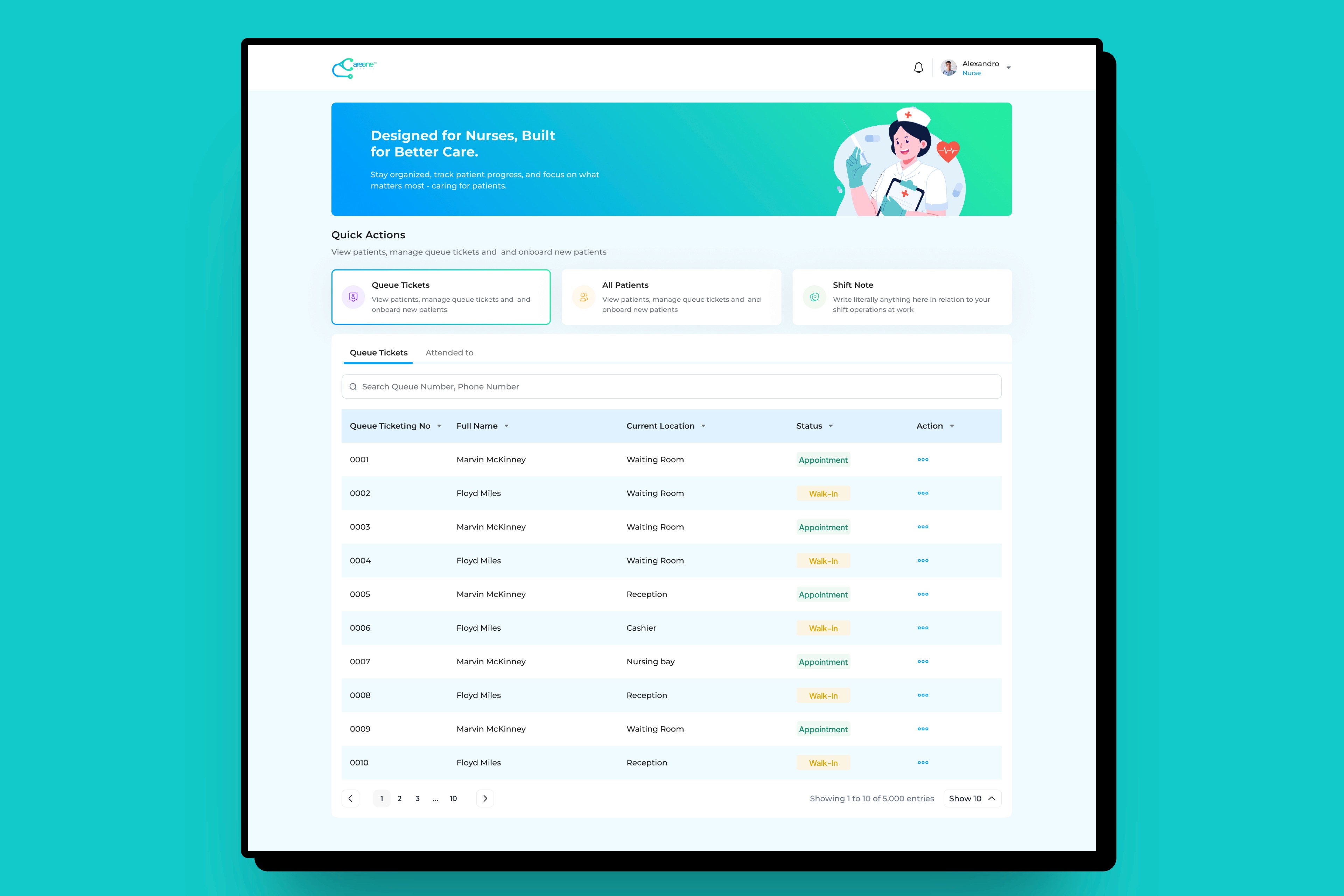
Nurse EMR | A dedicated portal for nursing staff to record patient vitals, administer medications, and track patient progress in real time. Provides alerts for medication schedules, patient updates, and task prioritization for nurses. |
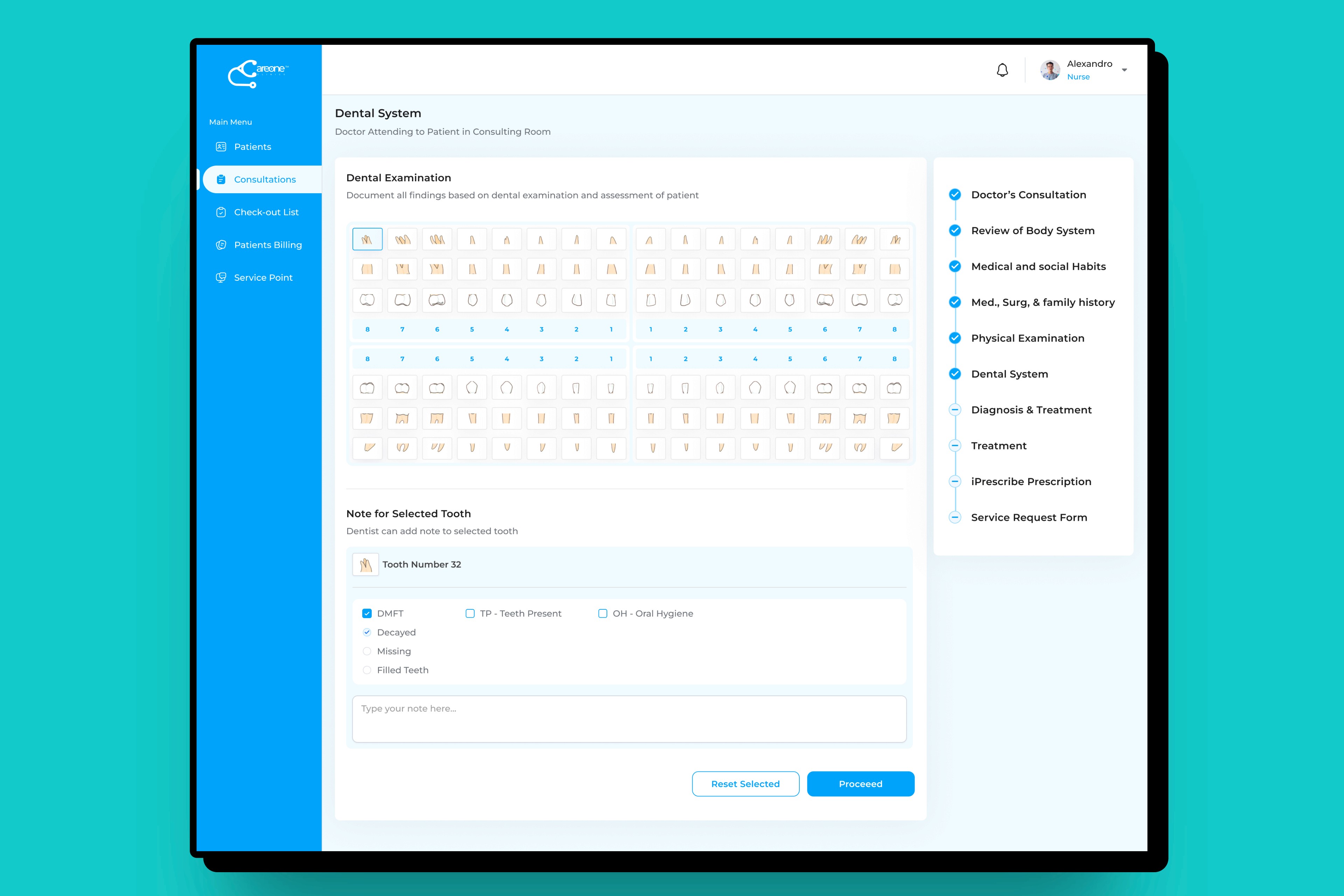
Dentist EMR | Specialized features for dentists, including patient dental charts, procedure logging, and treatment plans. Integration with patient records for a holistic view of the patient’s health, streamlining patient care coordination between dental and medical staff. |
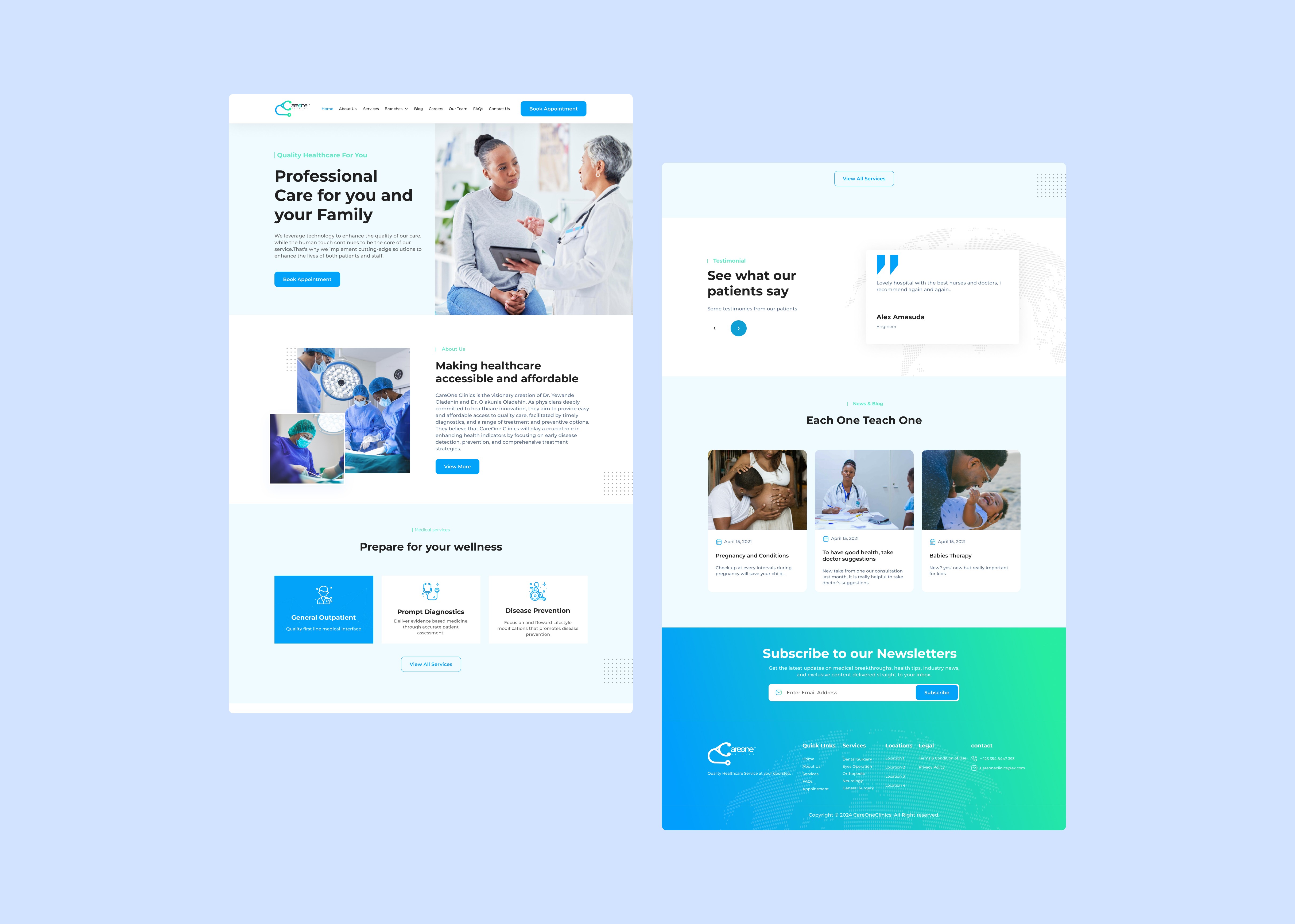
Landing Page | Clean layout, minimal sections, trust signals (certifications, testimonials), and CTA to “Book a Visit.” |
Design Approach and Processes
1. Discovery & Research
We conducted:
Stakeholder interviews with clinic managers, nurses, and GPs to map pain points.
Observational studies at physical clinics to understand ticketing workflows.
Desk research on healthcare SaaS systems and e-prescribing tools.
Competitor audits of platforms like Kareo, SimplePractice, and DrChrono.
These helped us identify friction points and essential features missing in typical local setups.
2. Information Architecture
I mapped the system into 4 modules:
Web Landing Page: Hero, clinic benefits, contact form.
Admin Dashboard: Overview metrics, user roles, queue status.
Ticketing System: Patient check-in, queue tracker, ticket printing.
Clinic Interface: EMR view, visit notes, iPrescribe flow.
3. Wireframes
I created low-fidelity wireframes for each module.
I iterated based on feedback from clinic staff and product managers.
4. Visual Design
I designed a modular, scalable interface system.
I used a calming medical color palette for trust.
I ensured consistency across web and internal tools.
5. Prototype & Handoff
I built interactive prototypes for user testing.
I shared assets and annotations with developers via Figma.
User Personas
Clinic Administrator (Ada, 38)
Needs to manage users, monitor queues, and ensure operational flow.
Pain Point: No oversight into live queue activity or staff performance.
General Practitioner (Dr. Yusuf, 45)
Needs quick access to patient history and seamless prescribing.
Pain Point: Rewriting prescriptions daily, delays in finding notes.
Patient (Ngozi, 29)
Wants a simple check-in process and reduced wait time.
Pain Point: Not knowing her queue position or estimated wait time.
Web Landing Page
Hero section with strong CTA and visuals
Clinic benefits: wait time reduction, EMR support, faster prescriptions
Interactive clinic locator
Contact & support integrations (live chat, call-to-action footer)
Admin Dashboard
Live dashboard: appointments, queue, sessions
User management with permissions (doctors, nurses, receptionists)
Logs, access control, and session history
Notification management for SMS/email alerts

Patient Queue & Ticketing System
Tablet-based self check-in
Real-time queue screen for waiting patients
Automated SMS/email queue updates

Clinic Interface (EMR + iPrescribe)
Patient profile: overview, history, vitals
Visit notes using structured templates (SOAP format)
Diagnosis and lab request modules
e-Prescribe: drug search, dosage entry, and digital sign-off
Dentist Portal
Specialized features for dentists, including patient dental charts, procedure logging, and treatment plans.
Integration with patient records for a holistic view of the patient’s health, streamlining patient care coordination between dental and medical staff.
Doctor's Portal
A comprehensive dashboard for physicians with access to patient data, appointment scheduling, medical records, and collaboration tools with other healthcare professionals.
Real-time updates on patient status, critical alerts, and treatment recommendations.
Appointment Scheduling
Patients can book, reschedule, or cancel appointments via a mobile app or web interface. Doctors, nurses, and specialists can view their daily schedules and patient histories.

Solution Design
The UI was kept clean and modern to reduce cognitive load:
Blue & white palette for clarity and calmness.
Consistent iconography and typography for role-based clarity.
Card-based layout for quick scanning in dashboards.
Responsive components for kiosk, tablet, and desktop views.
Design Challenges & Solutions
Challenge 1: Handling queue logic across multiple roles
Solution: Designed role-specific queue views — one for patients (read-only), another for admins (interactive).
Challenge 2: Doctor documentation fatigue
Solution: Created structured templates and default values for visit notes to reduce typing load.
Challenge 3: Onboarding non-tech-savvy clinic staff
Solution: Simplified admin interface and built a guided walkthrough/prototype video embedded in the dashboard.
Results & Impact
30% reduction in patient wait time through real-time ticketing.
100% digital prescription adoption in test clinics.
Higher clinic staff efficiency reported by 3 out of 4 beta testers.
Increased patient satisfaction based on early feedback.
Success Metrics
Avg. consultation wait time dropped from 26 min → 18 min
100% prescriptions processed digitally
Admin task completion increased by 40%
Clinic staff rated usability at 4.5/5 in usability surveys
Scalability
The modular design system enables:
Easy integration of lab modules, billing, and insurance features.
Rapid onboarding of new clinics with minimal training.
Custom role expansion for other medical specialties (e.g., dental, psych).
Lessons Learned
Simplicity is everything when designing for medical staff under pressure.
Building empathy with both admin staff and doctors helped bridge product gaps.
Role-based interfaces reduce overwhelm and improve usability drastically.
Future Plans
Would be interesting to see Teleconsultation modules.
Also to expand e-prescribe to support insurance claims.
Looking into enabling biometric login and secure cloud sync across multiple clinic branches.
Also maybe conduct wider rollout across urban and semi-rural clinics.