
Background
Sojorne is a digital family assistant designed for care providers of children with special needs. Founded in 2022 by parents raising children with unique health conditions, the mission was clear: to simplify, streamline, and unify the fragmented tools available to caregivers.
Managing care for a child with special needs is a full-time job, often requiring guardians to juggle medical appointments, therapy schedules, care routines, documents, and tailored services. Despite existing tools on the market, many parents find themselves using multiple disjointed apps to manage their daily caregiving responsibilities.
Sojorne aims to consolidate all essential caregiving tools into one seamless, user-centered mobile experience.
My Role
I served as the Sole Product Designer, responsible for:
Information architecture and journey flows in conjuction with the CTO and PMs
UX prototyping
UI design across mobile and web screens
Collaboration with PM and CTO
Developer handoff and QA support
Core Problem
Caregivers of children with special needs face a combination of physical, emotional, and administrative burdens. These include:
Constant medical and therapy appointments
Keeping detailed records of medications and health updates
Coordinating care among multiple service providers
Accessing specialized services tailored to unique developmental needs
Navigating a sense of isolation due to lack of community support
No single platform addressed all these needs holistically.
Key Requirements
To effectively support caregivers, the Sojorne mobile app needed to:
Centralize daily care tasks (medications, routines, documents)
Provide calendar and scheduling tools for appointments and reminders
Offer a care circle feature to delegate and communicate with other caregivers
Enable access to vetted service providers for specialized services
Foster a supportive community space for connection and shared experiences
Maintain strong privacy and HIPAA-compliant document management
Approach & Process - Research and Discovery
We began by deeply immersing ourselves in the lived experiences of caregivers. Since the founding team included parents of children with special needs, we had access to a network of potential users.
User Research
We conducted:
12 In-depth interviews with parents and guardians
5 shadowing sessions to observe daily care workflows
Survey (n=50) to identify most-used tools and biggest frustrations
Expert interviews with pediatric specialists and therapists
Care Circle
Add co-guardians (e.g., partner, nanny, therapist)
Assign tasks, share updates, and get notifications

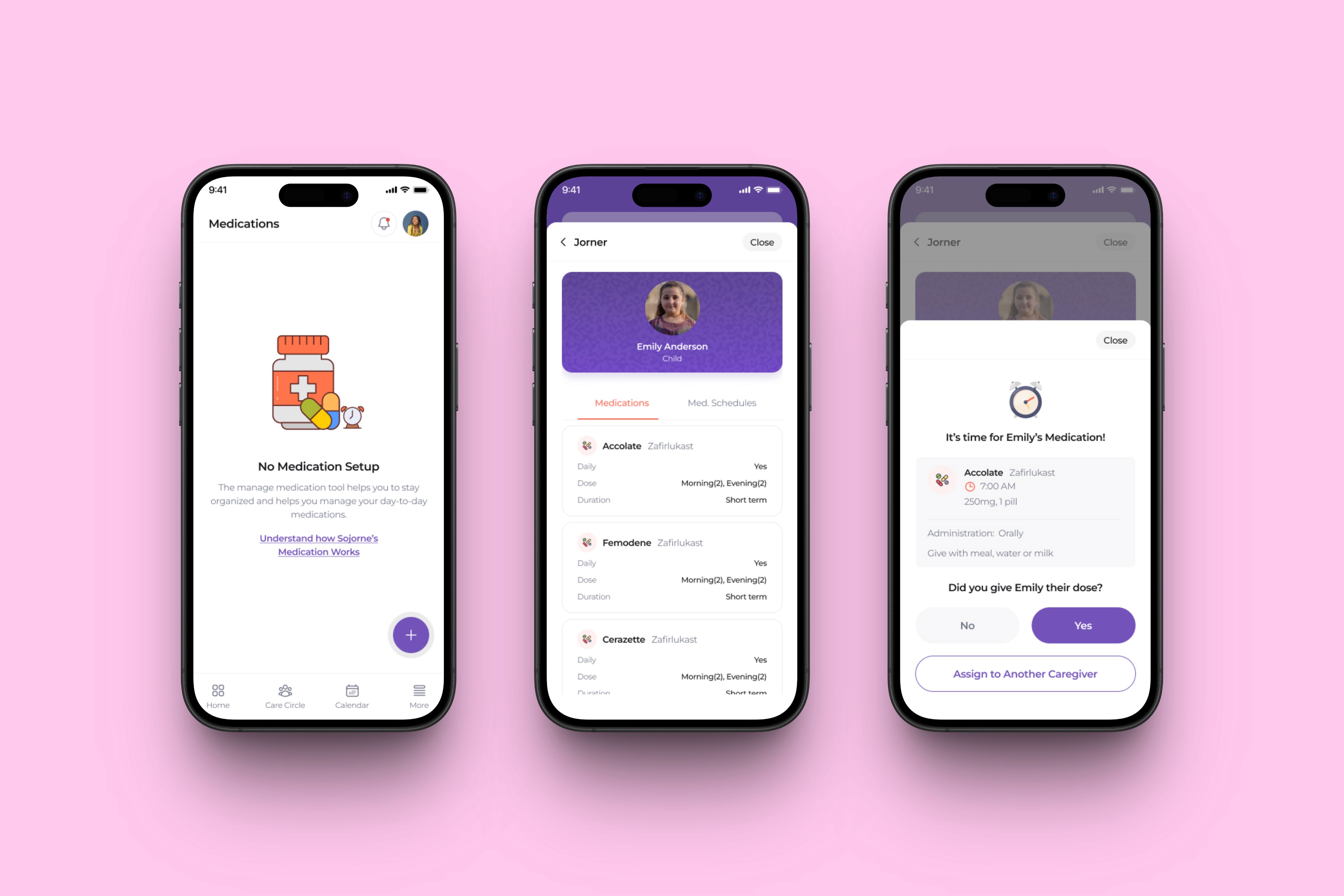
Medication Tracker
Schedule recurring meds with dosage and alerts
Store and share medical history with care providers
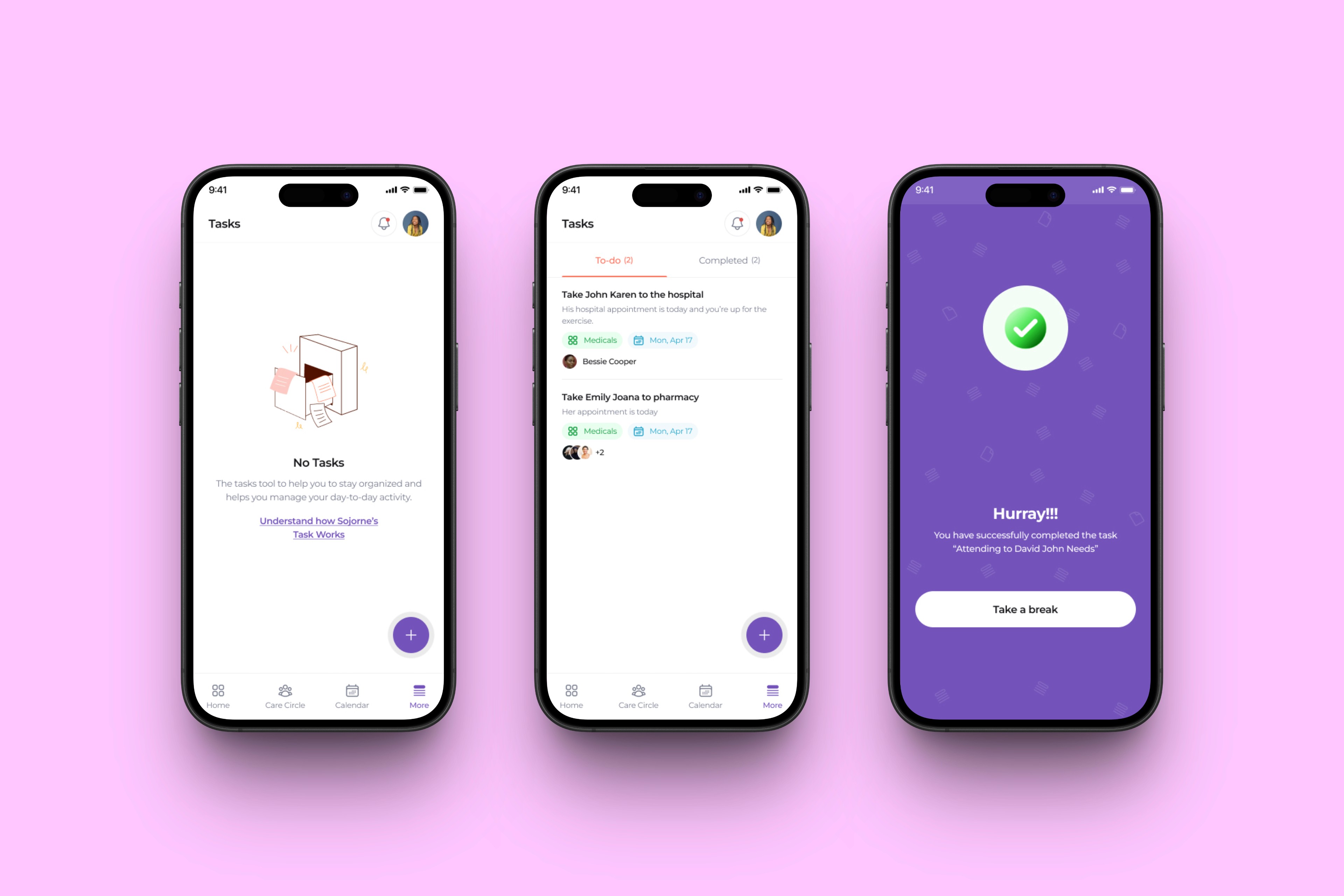
Task Manager
Daily/weekly tasks: feeding routines, therapy reminders
Integrated checklists and smart prioritization
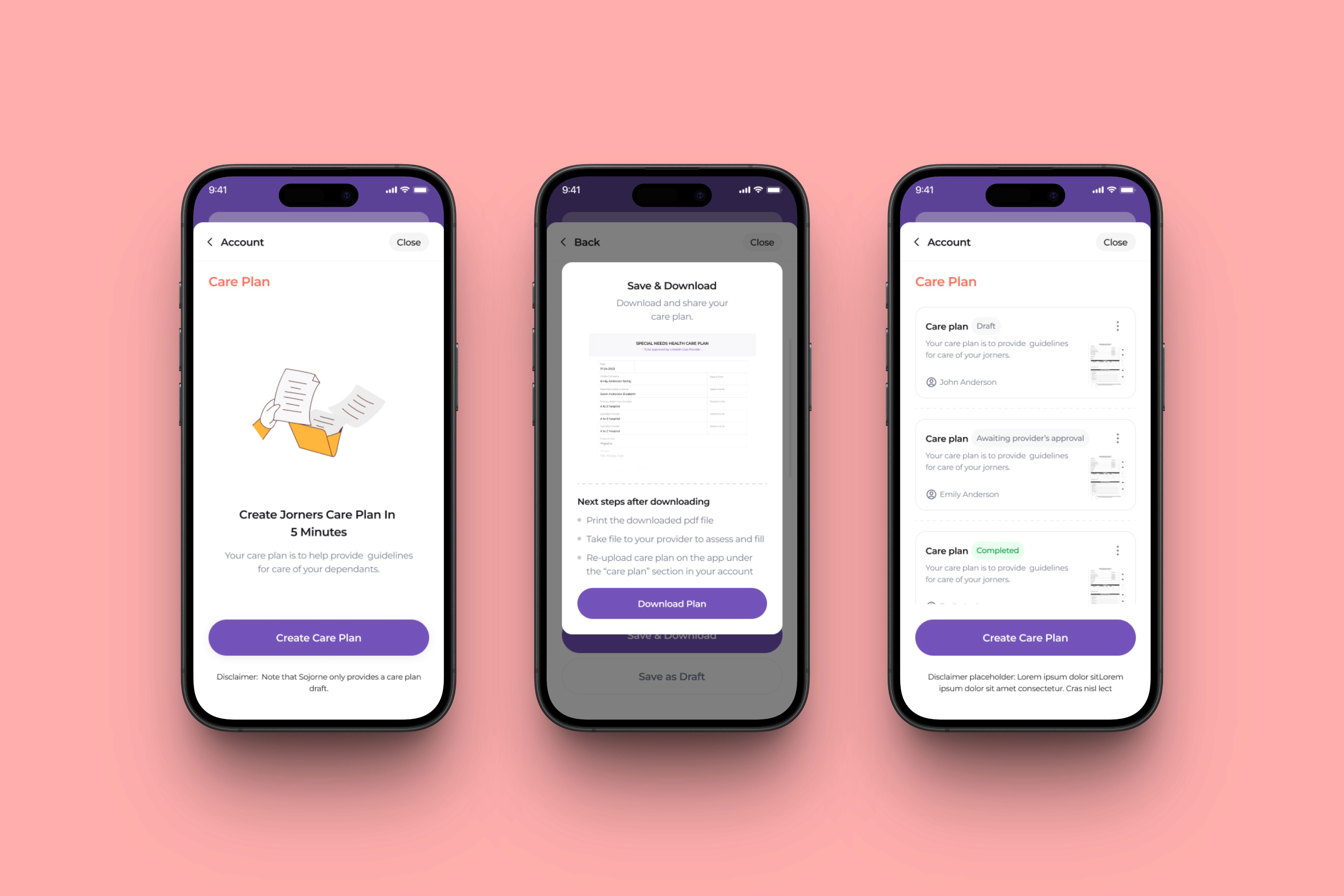
Care Planner
Custom care routines by child
Editable templates for common conditions
Scheduler
Visual calendar with sync options
Appointment reminders, telehealth links

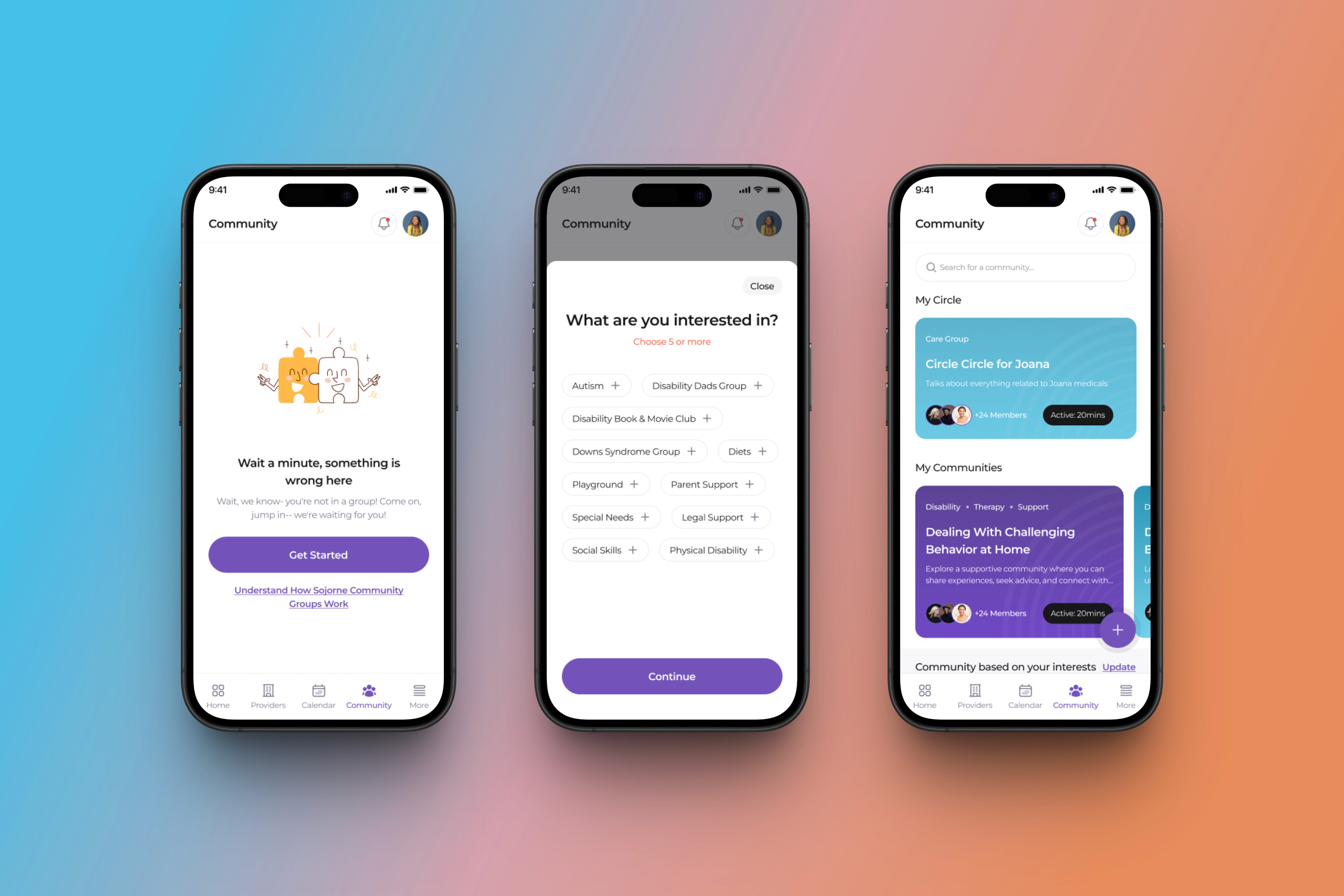
Community
Safe space for parents to connect, ask, and share
Moderated groups based on diagnosis, location, etc.
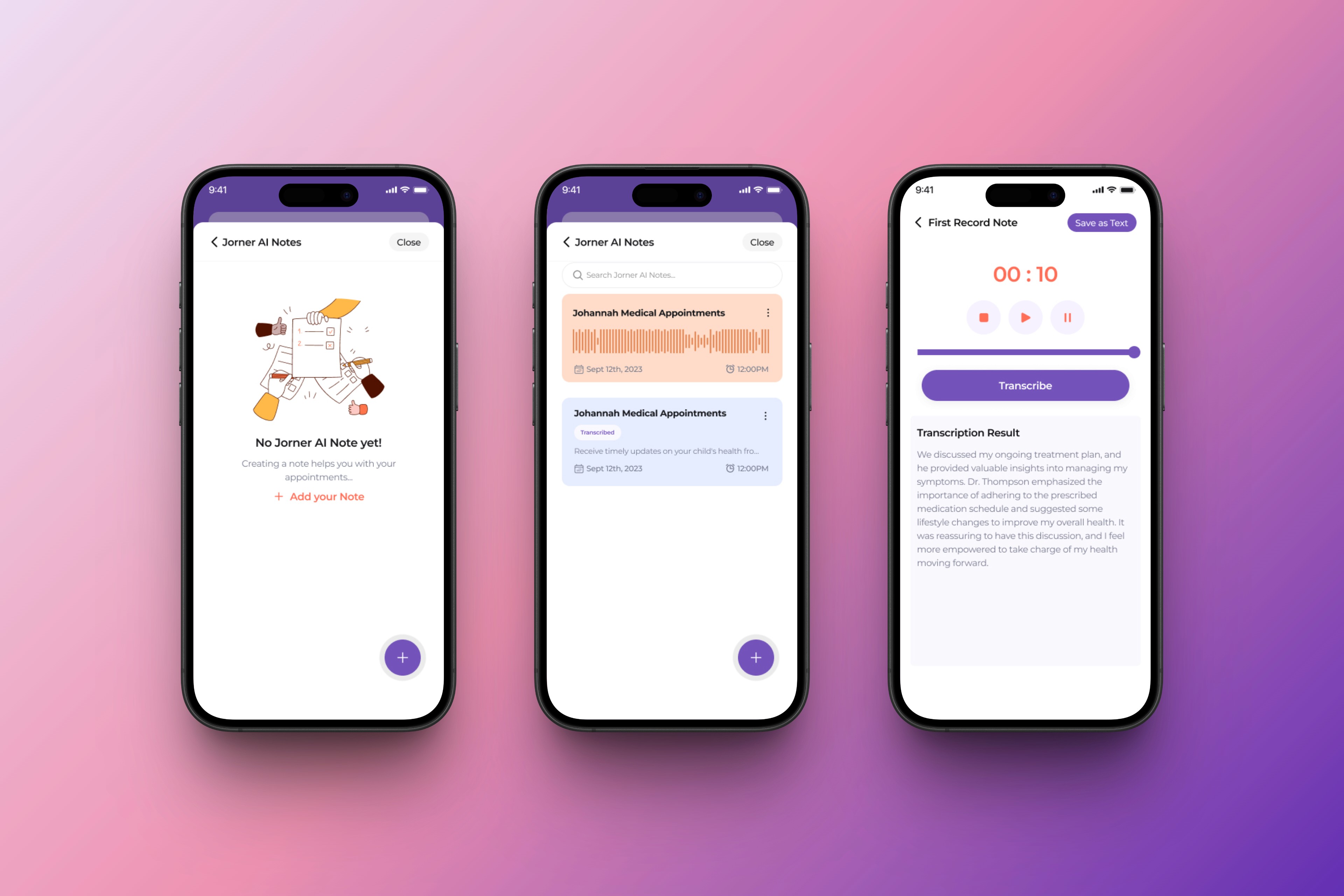
Voice Notes & Logs
Caregivers can quickly record voice notes during or after appointments to capture instructions, questions, or observations without needing to write.
Automatic transcription converts voice to text, making it searchable and easy to share with other caregivers or healthcare providers.
Notes can be tagged to children, dates, or care events (e.g., medication, symptom check-ins).
Solution Design and Features
Our visual and interaction design approach was:
Calm, soft UI using pastels and rounded edges to reduce stress
Onboarding walkthroughs for faster learning
Accessibility-minded (large touch targets, text scaling, WCAG color contrast)
We used Figma for design and prototyping, with Notion for documentation and Miro for IA diagrams.
Each module was tested in usability sessions, resulting in refinements like:
One-click access to the day’s top 3 tasks
Parent-friendly languages
Design Challenges and Solutions
Challenge 1: Too many features overwhelmed early testers
Solution: Phased rollout and modular onboarding. Users unlock new features as needed.
Challenge 2: Caregiver roles varied widely
Solution: Introduced role-based access control in the Care Circle, allowing customized permissions
Challenge 3: Privacy concerns
Solution: Built-in end-to-end encryption for documents and medical data + parental consent layers for sharing
Results and Impact
After MVP testing with 35 caregivers over 3 months, we achieved the following:
Success Metrics Achieved
85% task completion rate within the Care Circle
40% drop in missed appointments
90% satisfaction with document management features
7 out of 10 users said they felt less overwhelmed
65% of users used the voice notes/logs weekly, especially after appointments or during bedtime routines
Users reported feeling 30% more in control of follow-up care thanks to being able to capture insights on the go
78% of test users rated transcription accuracy and usefulness as "very high"
Increased Engagement
Community feature saw 60% weekly activity
45% of users invited at least 1 other caregiver into their Care Circle
Users spent an average of 12 minutes/day using Sojorne
Conclusion and Next Steps
Sojorne Mobile successfully positioned itself as a unique and valuable assistant in the world of caregiving for children with special needs. By unifying fragmented tools into one intuitive platform, we improved caregiver productivity, emotional wellbeing, and care quality.
Future Plans
Provider Booking Integration – schedule sessions with listed specialists
AI Recommendations – smart suggestions based on diagnosis and care patterns
Behavior Tracking Module – for autism and ADHD monitoring
Multi-language Support – starting with Spanish and French
Lessons Learned
Designing for Emotion is as Important as Functionality
Working on Sojorne reinforced how emotionally loaded caregiving can be especially for parents of children with special needs. Designing with empathy wasn't just about clean UI. It required listening deeply, building trust through design, and acknowledging the emotional weight users bring into the app.
Lesson: Build emotionally intelligent features, not just usable ones. For instance, community support and voice logs became central after listening to what overwhelmed parents really needed.
One-Size-Fits-All Doesn’t Work for Specialized Care
Caregivers have diverse routines, preferences, and tech literacy levels. What works for one parent (a structured care planner) may be overwhelming for another who prefers logging by voice.
Lesson: Flexibility is key. We included features like voice notes, modular task views, and personalized reminders to meet users where they are—not where we assume they should be.
Collaboration with Real Users Drives Meaningful Design
Involving parents and caregivers during research, wireframing, and testing allowed us to prioritize the real pain points rather than theoretical assumptions. This helped avoid over-engineering and kept the product grounded in practical use.
Lesson: No amount of internal ideation replaces co-designing with the end user. Their lived experience is the roadmap.
The "Invisible Work" of Care Needs Visibility
Parents juggle a mental load that doesn’t always get recorded in traditional systems, like remembering behavioral triggers or coordinating with extended family. By providing a care circle and shared logs, Sojorne helped surface this invisible labor.
Lesson: Great design can make unseen work visible and shared—reducing stress and improving coordination.
Clarity Beats Complexity, Always!
Early designs tried to pack in too many features on one screen, leading to cognitive overload. Iterations with feedback helped simplify flows and emphasize the most urgent actions.
Lesson: Especially for time-pressed users, minimal interfaces that highlight next steps outperform feature-dense layouts.
Technical Limitations Spark Creative Solutions
We initially faced challenges with real-time transcription accuracy for voice notes. This led to exploring progressive enhancement, starting with recorded logs, then uploading for transcription in the background while allowing manual edits.
Lesson: Design isn't only about what’s possible now—but how to deliver value even under limitations.